

Thinfinity® Workspace includes a very powerful tool that allows you to create 1-time disposable links. These links can be used to do integrations of all kinds.
The following are just some examples of what you can accomplish using OT URL:
– Automate connections: Securely start RemoteApps
– Protect your environment by using one-time disposable links
– Embed an RDP connection into a public web page
– Start a connection to a remote application with different parameters.
Thinfinity Workspace, offers a mechanism to generate One-Time-URL connections that expire after a given period of time.
The One-Time-URL feature is designed to work with the Access Profiles and User/Password Security Levels.
How to configure One-Time URL
You have to configure an ApiKey on the Configuration Manager Server in order to use this method.
These are some situations in which the One-Time-URL might be useful:
- Giving access to a desktop to external users without having to weaken the Security level to None.
- Generating temporary access to a desktop.
- Integrating the Configuration Manager on a Single-Sign-On Scheme along with external applications.
How it works:
- First, you need to ask Thinfinity® Workspace to generate the URL for you. Call Thinfinity® Workspace server following this URL format:
http(s)://HTTP finityRDP:Port/ws/oturl/get?
- The queryString should be built with all parameters listed below:
apikey= &apiuser= &model= &plen= &expires=
Find on the table below a description for each required parameter:
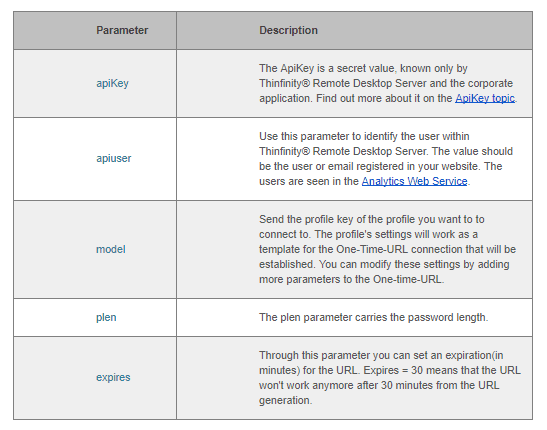
On the next topics, you can find out other parameters you can use to Configure the connection and Enable features.
- If Thinfinity Workspace gets to authenticate with the parameters sent on the queryString, it will return a One-Time-URL that will allow you to establish an RDP connection with the remote desktop.
/oturl.html?key=w7NJNschBdJD9e6G6luWhOCalM$oFW7guqC6jE1IQah3AJm3&pass=BOWZB8FG
Concatenate the Thinfinity Workspace address to the generated URL, following this format below:
http(s)://THTTPinityRDP:Port/oturl.html?key=w7HTMLchBdJD9e6G6luWhOCalM$oFW7guqC6jE1IQah3AJm3&pass=BOWZB8FG
This way, the URL will be ready to be used. You can redirect your application to the desktop connection through it, or even send it to an external user by email.
You will find an HTML/ajax example inside the application installation directory, under the ‘webrdp’ folder. The file is named oturltest.html and implements the features covered on this topic.
In conclusion, One-Time URL offers a useful way to extend web-enhanced applications to new scenarios. We are fully convinced that you will greatly benefit from this Thinfinity Workspace feature.