

The desktop virtualization landscape in 2025 continues to evolve rapidly, shaped by hybrid work, cost pressures, and the growing expectation that every workload should run securely and efficiently in the cloud.
Three major contenders dominate the conversation: Azure Virtual Desktop (AVD), Windows 365, and the increasingly popular Thinfinity VDI on Oracle Cloud Infrastructure (OCI).
Although each platform offers distinct advantages, their design philosophies differ greatly—from Azure’s infrastructure-centric flexibility to Microsoft’s SaaS simplicity and Thinfinity’s automation-driven, cloud-agnostic model.
This comparison analyzes their operational models, scalability, cost structure, and user experience to help IT leaders choose the right fit for their 2025 strategy.
Operating Model and Management Complexity
Azure Virtual Desktop (AVD) provides maximum configuration freedom but comes with high operational complexity.
Enterprises manage their own Azure resources, session hosts, image templates, FSLogix profiles, scaling rules, and networking. While this offers unmatched flexibility, it also demands deep Azure and VDI expertise. For large organizations with dedicated infrastructure teams, AVD’s granular control can be valuable. For smaller or leaner IT departments, it often translates into higher overhead and slower deployments.
Windows 365, in contrast, follows a “Cloud PC as a Service” model. Everything runs in Microsoft’s tenant, and desktops are provisioned and managed through Microsoft Intune. It’s the fastest way to give users secure, ready-to-use Windows desktops without managing infrastructure. However, it’s also the least customizable—limited to predefined SKUs and configurations. The new Frontline option introduces license sharing for shift workers, but RemoteApp publishing and deep networking customization remain unavailable.
Thinfinity VDI on OCI bridges these two extremes. It offers the full flexibility of a cloud-native VDI while automating the complexity that typically comes with it.
The Thinfinity Cloud Manager centralizes provisioning, monitoring, autoscaling, and hybrid deployment in one console. It integrates natively with Oracle Cloud’s KVM hypervisor, allowing enterprises to manage desktop lifecycles without scripts, PowerShell, or external runbooks. Hybrid extensions to VMware, Hyper-V, Proxmox, and VergeIO make it easy to unify multi-platform environments under a single management layer.
The result is a modern operational model where automation replaces manual orchestration—delivering agility without requiring deep cloud specialization.
Customization vs. Simplicity
When it comes to flexibility, AVD remains the gold standard for complex deployments. It supports pooled or personal desktops, multi-session Windows 11 and Windows 10, and RemoteApp delivery. IT administrators can fully control networking, FSLogix, scaling rules, and host image maintenance. However, that same flexibility can be a double-edged sword: it takes time, scripting, and expertise to configure properly.
Windows 365, meanwhile, is the simplest to use. Desktops are predefined in size and performance tiers, and provisioning is instant. This is ideal for non-technical teams, small businesses, or temporary workforces that need consistent Cloud PCs. But its simplicity comes at the cost of adaptability—there’s no multi-session model (except limited Frontline mode), and app-only publishing isn’t supported.
Thinfinity VDI on OCI blends simplicity and control through automation templates. It supports session-based desktops, pooled or 1:1 persistent VMs, GPU-accelerated workstations, and RemoteApps—all deployable from prebuilt policies. IT teams can customize images and resources while preserving the speed of SaaS-like provisioning.
Network complexity is reduced, too: Thinfinity connects directly to OCI’s virtual networking and can link on-premises resources through secure hybrid connectors.
This balanced approach delivers the simplicity of Windows 365 with the flexibility of AVD—without requiring third-party tooling or heavy customization.
Cost Structure and Optimization
Cost remains the single most decisive factor for most VDI projects in 2025. Here, the differences are striking.
Azure Virtual Desktop operates under a pay-as-you-go model tied to Azure IaaS consumption.
With proper tuning—reserved instances, rightsizing, and autoscaling—it can be cost-efficient. But misconfiguration is common, and idle resources can inflate monthly bills significantly. Analyst data from ESG and Gartner show that unoptimized cloud desktops can exceed budget by 40–60% in large deployments.
Windows 365 takes the opposite approach: fixed monthly pricing per user.
This predictable subscription model suits steady workloads, but it removes elasticity. Whether a user connects for one hour or one hundred, the cost remains the same. For shift-based or seasonal workforces, this often results in over-payment for unused capacity.
Thinfinity VDI on OCI combines the best of both models.
It leverages Oracle Cloud’s competitive pricing—often up to 50% lower than Azure or AWS—and layers broker-level autoscaling to automatically power down idle desktops. OCI’s pricing also includes 10 TB of free outbound data transfer per month per region, a significant cost advantage for globally distributed teams.
When compared to legacy Citrix or VMware environments, Thinfinity typically cuts total cost of ownership (TCO) by 30–50%, and by 20–30% versus poorly optimized AVD setups.
For finance teams, this model offers both predictability and elasticity—two qualities rarely found together in desktop virtualization.
Scalability and User Experience
All three platforms can scale, but they do so differently.
AVD scales horizontally by adding more session hosts through Azure infrastructure. It handles variable workloads effectively, but scaling events depend on rules, scripts, or third-party schedulers. Management overhead increases as complexity grows.
Windows 365 scales simply through license assignments. It’s instant but static—licenses represent the upper limit of active users. There’s no real-time elasticity.
Thinfinity VDI on OCI, however, uses real-time autoscaling directly tied to user activity and policy thresholds.
When demand increases, new desktops are automatically provisioned on the OCI hypervisor; when it drops, unused ones are powered down. Users can launch Windows or Linux desktops, GPU-accelerated design workstations, or published apps through a browser or Thinfinity client.
Support for up to 16 monitors, H.264 streaming, and compressed WebSocket protocols ensures a near-local experience even over WAN connections.
Comparative Overview (2025 Essentials)
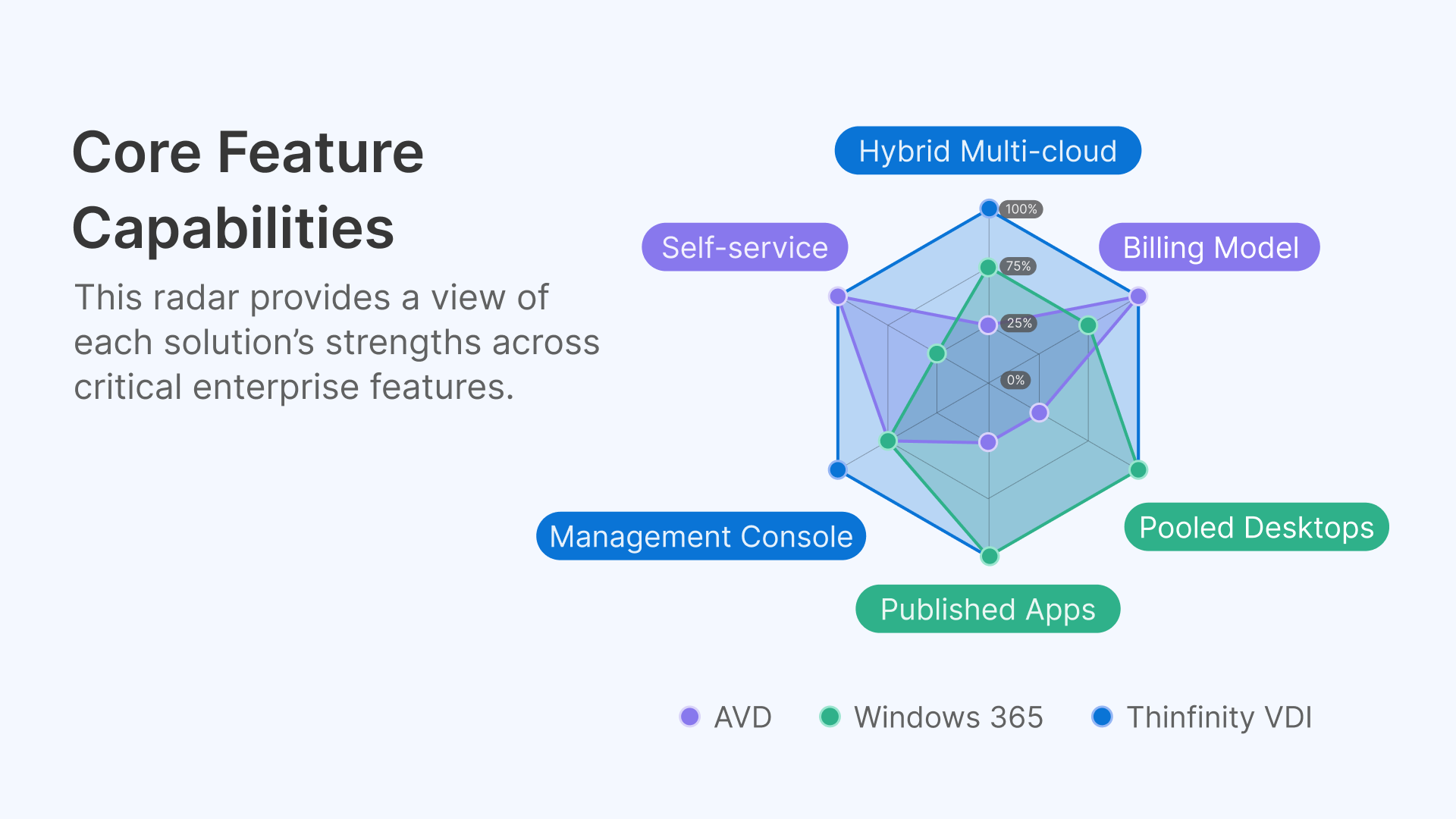
| Feature | Azure Virtual Desktop | Windows 365 | Thinfinity VDI on OCI |
|---|---|---|---|
| Primary use case | Complex, variable workloads; Azure-centric organizations | Simple, predictable Cloud PCs for steady usage | Automated, cost-optimized enterprise VDI; hybrid & multi-cloud |
| Hosting tenant | Customer Azure tenant | Microsoft tenant | Customer OCI tenant or hybrid (VMware, Hyper-V, Proxmox, VergeIO) |
| Billing model | Pay-as-you-go Azure resources | Fixed per-user/month | OCI consumption + autoscaling (no idle cost) |
| Customization | Full control, scripting required | Predefined SKUs | Policy-based templates (session, pooled, GPU) |
| Multi-session desktops | Yes | Limited (Frontline shared mode) | Yes |
| RemoteApps / App delivery | Supported natively | Not available | Supported natively |
| Profile management | FSLogix (manual config) | Local profile | FSLogix + Thinfinity automation |
| Networking | Customer VNet | Microsoft-managed | OCI networking + on-prem integration |
| Management tools | Azure Portal, PowerShell, CLI | Intune | Thinfinity Cloud Manager |
| Hybrid capability | Azure Stack / Local | None | Full (VMware, Hyper-V, Proxmox, VergeIO) |
| Business continuity / DR | Customer responsibility | Built-in for Cloud PCs | Integrated HA/DR on OCI multi-region |
Choosing the Right Platform
Azure Virtual Desktop (AVD)
Best suited for organizations with strong Azure and VDI expertise that need granular control over every component—ideal for complex, variable workloads where flexibility outweighs simplicity.
However, enterprises without dedicated optimization teams may find costs unpredictable and management heavy.
Windows 365
A perfect fit for organizations prioritizing speed, predictability, and simplicity.
If you want a plug-and-play Cloud PC experience with fixed monthly costs and minimal IT involvement, Windows 365 delivers. It’s particularly effective for small teams, temporary workers, or front-line scenarios.
Thinfinity VDI on Oracle Cloud
Ideal for organizations seeking cloud-native automation, lower TCO, and hybrid/multi-cloud flexibility without vendor lock-in.
It combines the elasticity of AVD with the simplicity of Windows 365—powered by OCI’s economics and automation. Thinfinity’s Cloud Manager orchestrates provisioning, autoscaling, and policy enforcement from a single pane of glass.
For enterprises replacing Citrix or VMware, or scaling globally across Oracle’s 46+ regions, Thinfinity delivers enterprise-grade performance with significantly lower operational complexity.
Conclusion: The Best of Both Worlds
The 2025 VDI market no longer rewards monolithic or overly complex architectures.
Enterprises want elasticity, automation, and cost control—without sacrificing flexibility or security.
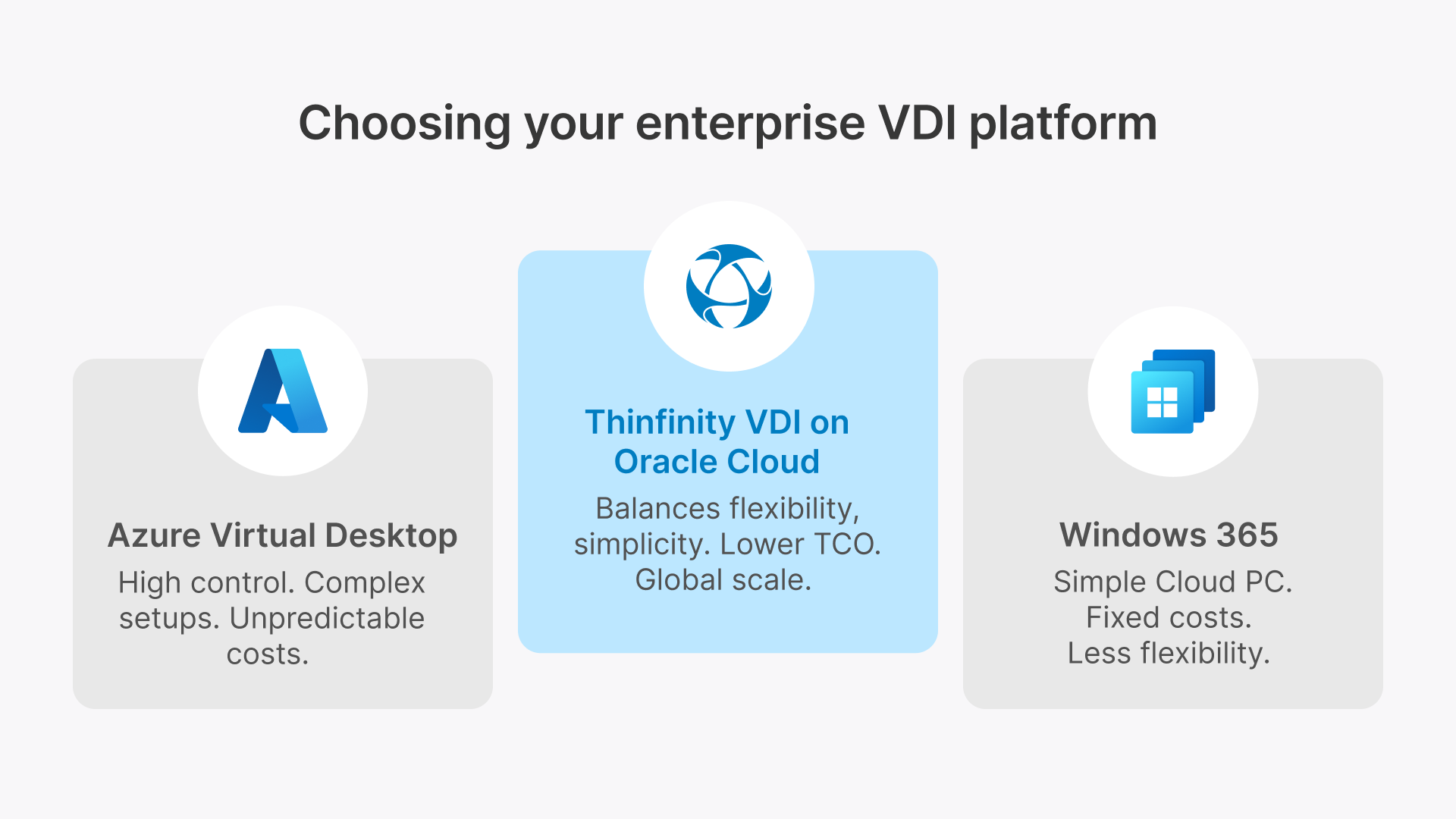
- Azure Virtual Desktop offers deep customization but demands expertise.
- Windows 365 offers simplicity but limits control.
- Thinfinity VDI on OCI merges the two, providing an automation-driven platform with OCI’s economic advantage, integrated autoscaling, and multi-cloud reach.
As IT budgets tighten and hybrid work becomes the default, Thinfinity’s automated, clientless, and cloud-agnostic approach stands out as a sustainable and future-ready model for virtual desktop delivery.