


Why this matters now
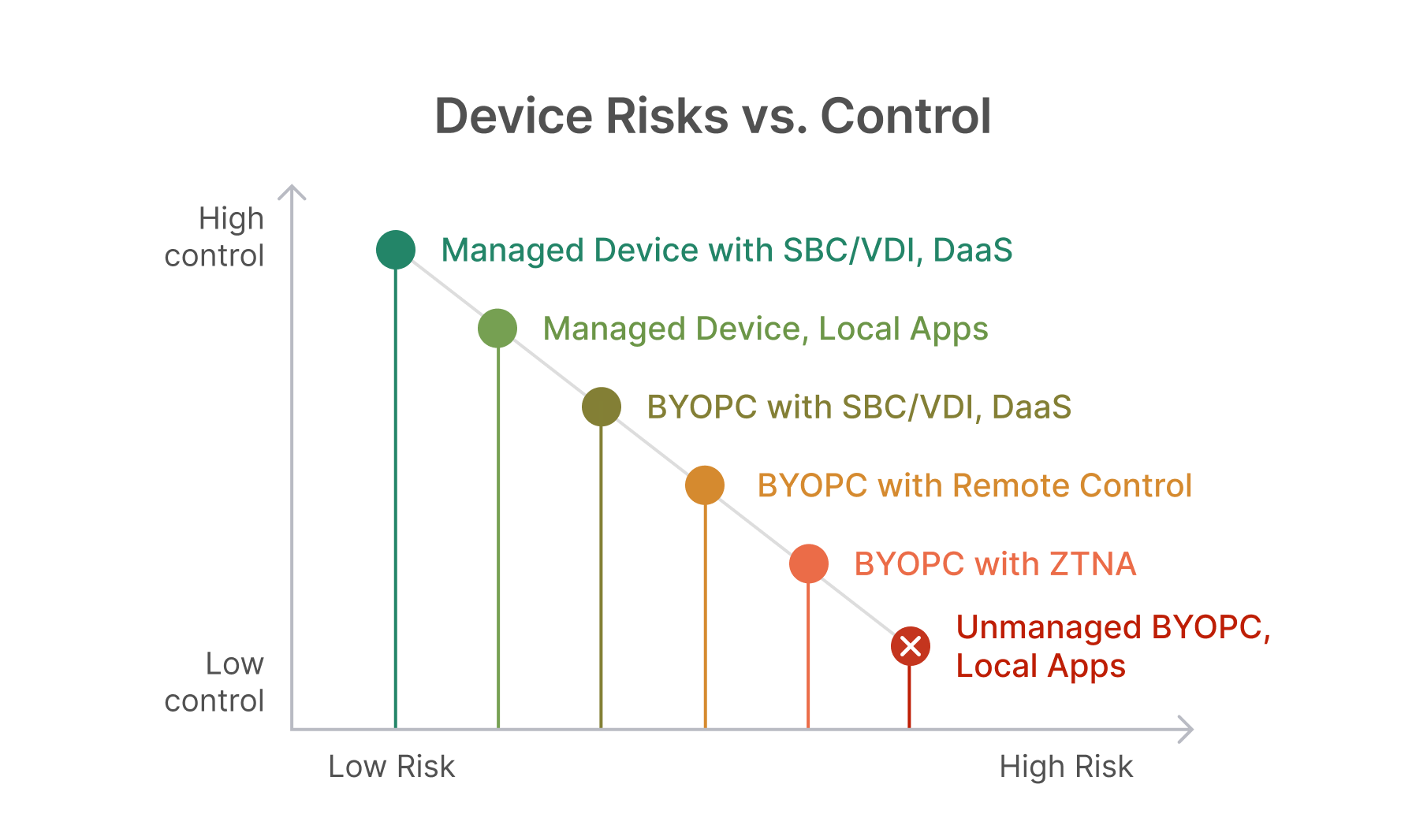
Hybrid work is permanent, supply chains are partner-heavy, and sensitive workflows live across on-prem, SaaS, and multiple clouds. The hard truth: the less control you have over the endpoint, the more risk you absorb—especially for identity theft, data exfiltration, and remote-tool abuse. The “Device Risks Versus Controls” model captures that trade-off on a single diagonal line: move up and left (more control, lower risk) by centralizing delivery and tightening identity.
This article turns that model into a CISO-ready technical plan—policies, architectures, and KPIs for each access pattern—then adds a hands-on blueprint for Thinfinity Workspace on Oracle Cloud Infrastructure (OCI) so you can operationalize Enterprise VDI/DaaS at scale or package it as a partner service.
Decoding the chart: from highest risk to highest control
Visualizing the chart: the x-axis is Risk (low → high), the y-axis is Control (low → high). Each step to the left and up reduces breach likelihood and impact. Here’s how to apply it.
1) Unmanaged BYOPC running local apps — Avoid
Risk profile: Data lands on unknown devices; no reliable posture, patching, or logging. Shadow IT proliferates, forensics are weak, and legal exposure grows.
Policy stance:
- Prohibit local installs for sensitive data.
- Allow only non-sensitive resources; no sync, no offline, no exports.
- Issue time-boxed, least-privilege identities for temporary needs.
Controls & ops:
- Block legacy/basic auth.
- Quarantine detections of unmanaged endpoints trying to reach restricted apps.
- Monitor for unsanctioned remote-access tools.
KPIs: Unmanaged device access attempts; blocked downloads/prints; shadow IT detections.
2) BYOPC with ZTNA (Secure App with risk monitoring)
Risk profile: Better. Users don’t get network access; they get per-app access with continuous checks.
Policy stance:
- MFA for all remote access (prefer phishing-resistant).
- Conditional access on identity + device posture + session risk.
- Data-centric controls: isolation, watermarking, DLP egress rules.
Controls & ops:
- Identity provider as policy brain; step-up auth on anomalies.
- Session-level logging (user, device, app, action).
- Rapid revocation and session kill-switch.
When to use: Contractors, partners, M&A users; SaaS and internal web apps.
KPIs: Risk-based blocks; session terminations; download attempts from unmanaged endpoints.
3) BYOPC with remote control (In-office PC or jump box)
Risk profile: Improves containment but is attacker-attractive if directly exposed or poorly governed.
Policy stance:
- Broker every session through an identity-aware gateway—no direct inbound ports.
- Require approvals and time windows; record privileged sessions.
Controls & ops:
- Just-in-time credentials; vault issuance.
- App allowlists; geo/time fencing for vendors.
- Automated revocation and forensic capture on incident.
When to use: Exceptional cases for legacy hardware/apps bound to a specific workstation.
KPIs: Remote-tool inventory drift; privileged session violations; time-to-revoke.
4) BYOPC with SBC/VDI/DaaS (Secure Apps & Data)
Risk profile: Strong. Apps/desktops render centrally; no data persists on the endpoint.
Policy stance:
- Default-deny for clipboard/drive/print redirection; enable via workflow with logging.
- Network micro-segmentation around brokers and session hosts.
Controls & ops:
- Gold-image hygiene; rapid patch windows.
- EDR/XDR on session hosts and brokers.
- Autoscaling for performance; watermarking to deter exfiltration.
When to use: Finance, healthcare, IP-heavy teams, and any sensitive workload.
KPIs: Policy exceptions granted; patch SLA on images; blocked exfiltration attempts.
5) Managed device with local apps (Secure Device)
Risk profile: Good if baselines are enforced, but data can still leave the perimeter.
Policy stance:
- Full UEM/MDM with disk encryption, verified boot, browser and OS auto-updates.
- Least privilege (no local admin), application control, and strong MFA/passwordless.
Controls & ops:
- EDR + threat hunting; isolate on detection.
- Device certificates for mutual TLS and device attestation.
- Rapid, measurable patch cycles.
When to use: Power users and offline scenarios.
KPIs: Patch latency; EDR containment time; unmanaged app execution rate.
6) Managed device with SBC/VDI/DaaS (Secure Experience — highest control)
Risk profile: Best available mix of UX and governance.
Policy stance:
- Access to Restricted apps requires both managed device compliance and VDI app delivery.
- Session logs linked to user + device + app for eDiscovery and audits.
Controls & ops:
- Risk-based re-auth; dynamic policy during session.
- Segregated control plane; strict east-west segmentation.
When to use: Privileged operations, compliance-heavy workloads, executive access.
KPIs: % of restricted apps behind VDI; drift findings on gold images; audit completeness.
Decide by use-case: mapping people and apps to models
| Workforce / App Type | Recommended Model | Why it wins | Extra controls |
|---|---|---|---|
| Contractors/partners on web apps | ZTNA per-app | No network access, strong session policy | Isolation, DLP, watermarking |
| Legacy client/server | SBC/VDI/DaaS | Centralized data + patching | Disable redirection by default; vault creds |
| Privileged admins | Managed device + VDI jump host | Highest control + full traceability | PAM, JIT/JEA, session recording |
| Field/offline users | Managed device + local apps | Offline capability, strong device posture | Strict UEM baselines, rapid patch SLAs |
Baseline controls that cut risk everywhere
- MFA everywhere for remote access; retire legacy auth.
- Conditional access that evaluates identity, device posture, and session context continuously.
- Data-centric egress controls (DLP, isolation, watermarking, no-download policies).
- Remote-tool governance: inventory, broker, and monitor; block shadow tools.
- Patching discipline: gold-image pipelines; measurable SLAs; change control with drift detection.
- Observability & automation: UEBA, anomaly-driven step-up, auto-quarantine, and kill-switch.
A 30/60/90-Day Execution Plan for CISOs
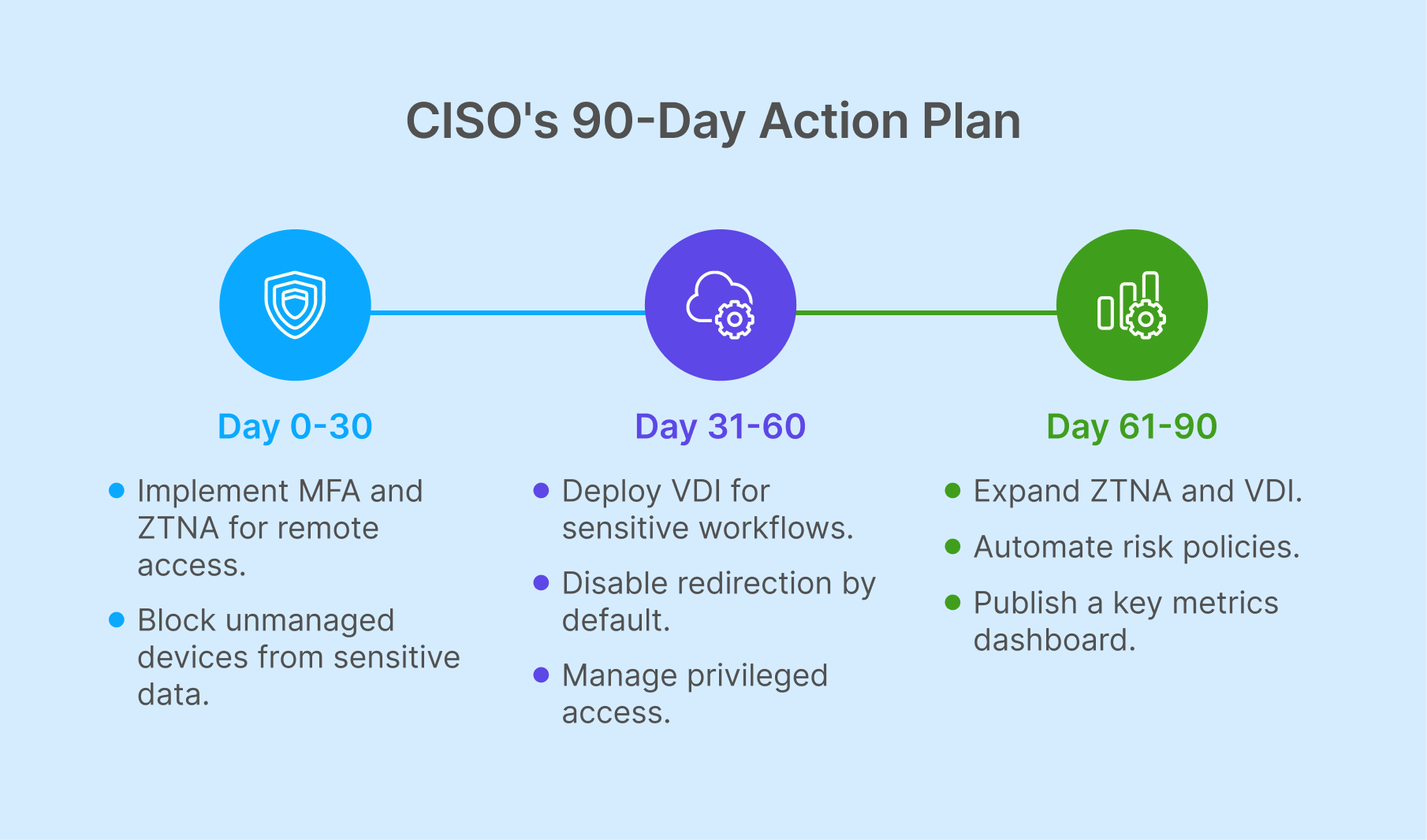
Implementing Zero Trust is not a one-time switch—it’s a transformation that needs structure, milestones, and visible results. For CISOs under pressure to prove value quickly, a 30/60/90-day execution plan provides a roadmap that balances immediate protections with long-term resilience.
Days 0–30: Prove and Protect
The first month is about creating a strong baseline. Enforce multi-factor authentication and conditional access across the enterprise to raise the security floor. Block unmanaged local applications from interacting with restricted data. Launch a pilot of ZTNA on two or three contractor-facing web apps to validate early principles. At the same time, inventory all remote-access tools and either eliminate or broker direct connections. These steps deliver fast, visible wins and demonstrate early risk reduction.
Days 31–60: Centralize and Segment
With the foundation set, the second month shifts to control and segmentation. Stand up an initial VDI or SBC pool to handle a highly sensitive workflow, ensuring secure access through a managed environment. Disable redirection by default and introduce a formal approval process for exceptions. Standardize updates with a gold-image patching cadence and attach EDR/XDR to session hosts for deeper visibility. Privileged workflows should now be transitioned to managed devices and VDI jump hosts secured by PAM, closing one of the most exploited attack vectors.
Days 61–90: Automate and Demonstrate Risk Reduction
The final month emphasizes scale, automation, and reporting. Expand ZTNA and VDI coverage based on a sensitivity matrix—classifying applications as Public, Internal, Confidential, or Restricted. Enable risk-based reauthentication and automated session termination to dynamically adjust access in real time. Most importantly, publish a CISO dashboard that highlights unmanaged access attempts, policy-blocked sessions, patch SLA adherence, and time-to-contain metrics. By this stage, the program is not only operational but also measurable, giving CISOs the evidence they need to demonstrate real business impact.
The Business Case
This phased approach ensures CISOs can show progress at every checkpoint while building toward sustainable maturity. It aligns executive expectations, secures user adoption, and proves that Zero Trust is more than a security initiative—it’s a framework that reduces risk, improves compliance, and delivers measurable business value.
Board-Level Metrics That Resonate
When CISOs present to the board, the key is to move beyond technical jargon and highlight metrics that reflect risk reduction, operational health, and business resilience. These measures must connect directly to outcomes executives care about—protecting critical assets, ensuring uptime, and minimizing financial exposure.
Access posture is one of the most telling indicators. Boards want to know what percentage of restricted applications are safeguarded behind VDI or DaaS environments and how much of remote access is reinforced with MFA. These figures demonstrate how effectively identity and access controls are being enforced.
Exposure window provides a reality check on how quickly vulnerabilities are closed. Tracking the median days-to-patch across gold images and brokers gives a clear sense of operational responsiveness, which directly impacts the likelihood of a successful attack.
The human layer remains a critical variable. Metrics such as phishing simulation trends, the number of risky sessions blocked, and average time-to-revoke access after compromise reveal how well the organization is managing user-driven risks.
Loss prevention is another board-level concern. Reports on egress controls—such as the number of download, print, or clipboard actions blocked—and counts of prevented data-leak attempts show that protective measures are actively containing sensitive information.
Finally, operational health metrics ensure the security program is not just protective but also reliable. Broker and session-host uptime, autoscaling events against SLAs, and image drift findings all signal whether the environment is stable, resilient, and ready to scale without disruption.
By framing security performance through these lenses, CISOs can deliver updates that resonate with board members—metrics that are quantifiable, relevant, and directly tied to business outcomes.
Thinfinity Workspace on Oracle Cloud (OCI): The Execution Engine
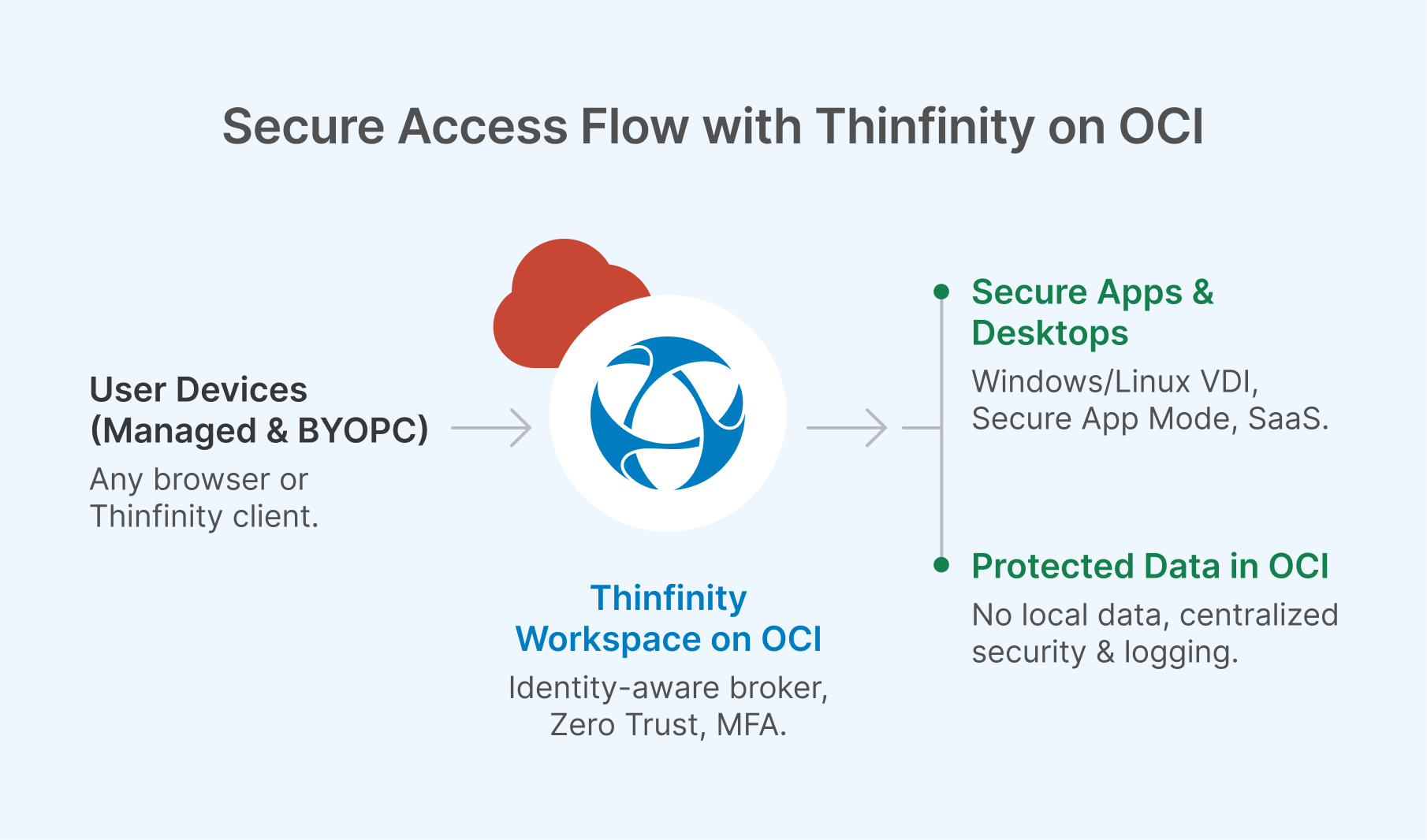
Once you’ve defined your Zero Trust policies, the next challenge is finding an execution engine that makes “high control, low risk” both fast to deploy and easy to manage at scale. This is where Thinfinity Workspace on Oracle Cloud Infrastructure (OCI) comes in. It brings together Zero-Trust-aligned delivery, centralized data, and high performance in a platform designed for modern enterprise VDI and DaaS.
Why Enterprises Choose Thinfinity on OCI
At its core, Thinfinity eliminates the need for traditional VPNs by enabling identity-aware brokering with per-app and per-desktop policies, integrated MFA, and conditional access—accessible seamlessly from either a browser or a native client. Because applications are centrally rendered, data never leaves the core. Administrators maintain granular control over copy/paste, printing, drive mapping, and USB redirection, with permissions enabled only through structured workflows rather than by default.
Performance is another critical differentiator. By leveraging OCI’s flexible compute and GPU shapes along with its low-latency global networking, Thinfinity delivers responsive sessions equally well for knowledge workers and for graphics-intensive users who depend on CAD, 3D modeling, video editing, or AI workloads. For governance and identity management, it integrates directly with Active Directory, Azure AD, and OCI Identity to enforce RBAC, Just-in-Time (JIT) provisioning, and comprehensive audit trails. And because it’s cloud-agnostic, enterprises can start on OCI today and extend seamlessly into hybrid or multi-cloud models without lock-in.
Flexible VDI Flavors on OCI
Thinfinity supports multiple delivery “flavors,” allowing enterprises to tailor environments to specific use cases. Persistent desktops provide developers and analysts with dedicated environments, while non-persistent desktops reset on logout to optimize compliance and control costs—ideal for training or call center operations. Session-based desktops offer multi-user, task-oriented environments at scale. GPU-powered workstations deliver workstation-class responsiveness for advanced design and AI scenarios. Finally, Secure App Mode enables organizations to publish a single application or a small set of apps, making it perfect for legacy ERP, accounting tools, clinical systems, or SCADA consoles.
Reference Controls to Strengthen Security
Thinfinity on OCI comes with a wide range of reference controls that reinforce Zero Trust principles. For identity, enterprises can enforce MFA, enable passwordless authentication, apply conditional access, and factor in device compliance. Data and session controls default to denial of redirection, with exceptions only enabled through policy, alongside watermarking and session recording for privileged activity. At the network layer, applications are kept private through micro-segmentation of brokers, gateways, and session hosts, ensuring no direct inbound exposure. On the operational side, Thinfinity enables autoscaling, blue/green publishing of gold images, image drift scanning, centralized logging, and SLA-driven health dashboards.
The Execution Advantage
By combining OCI’s global infrastructure with Thinfinity’s Zero Trust architecture, enterprises gain an execution engine that doesn’t just align with policy—it enforces it dynamically. The result is a secure, high-performance, and flexible platform that reduces risk, accelerates deployment, and scales with the business.
The takeaway
To move up and left on the device risk vs. control curve, make identity your perimeter and deliver apps through controlled planes—ZTNA for web, VDI/DaaS for enterprise workloads. Thinfinity on OCI operationalizes that strategy: centralized data, tight per-session policy, and performance that scales globally. For CISOs, it’s the practical path to lower breach likelihood and faster recovery. For Oracle partners, it’s a repeatable DaaS service that customers can adopt with confidence.